Showing posts with label Tower Defense. Show all posts

Wednesday, 11 May 2016

Tower Defense Starter Kit v1.2 Update Dev Log #2: Level Selection Menu

Apart from the Artillery Tower mentioned in an earlier post [Link: http://unrealpossibilities.blogspot.in/2016/05/tower-defense-starter-kit-v12-update.html], the other new feature that will be available in the v1.2 update for Tower Defense Starter Kit is a Level Selection Menu. With this new system, the player can choose from any of the unlocked levels in the project when starting a game. As the player progresses through the campaign, more levels will get unlocked automatically which then gets reflected in the menu & remains persistent throughout subsequent instances of the game. The player can also choose between the default campaign mode or the endless mode before starting a level.

The list of levels as well as information about the selected level are displayed dynamically at runtime based on the information specified in the Level Data Array by the designer as well as the changes that have been made to it throughout later instances of the game. The dynamic nature of the menu system enable the developers to add new levels & the associated information into the Level Data Array without worrying about handmade changes to the HUD.

Moving on to the specifics, the unlocked levels are listed using a scrollbox that uses custom widgets as it's children, while the level information showcases how to use vertical boxes to display UI elements. Apart from the Level Selection Menu, I've added a very minimalist Main Menu as well as some improvements to the End Game HUD. The End Game HUD is now neatly structured using a vertical box which dynamically alters itself based on the end result of the current level. For example, the Continue button is displayed only when the following conditions are satisfied: the player has completed the current level; & there are further levels to unlock after the current level. An additional option has also been added to return to the Main Menu from the End Game HUD.

Here's a short preview video of the Level Selection Menu:


For more information, check out the official unreal engine forum support thread at: https://forums.unrealengine.com/showthread.php?102675-Tower-Defense-Starter-Kit-Support-Thread

Thursday, 5 May 2016

FPS Tower Defense Toolkit Tutorial #1: How to convert this into a TPS project

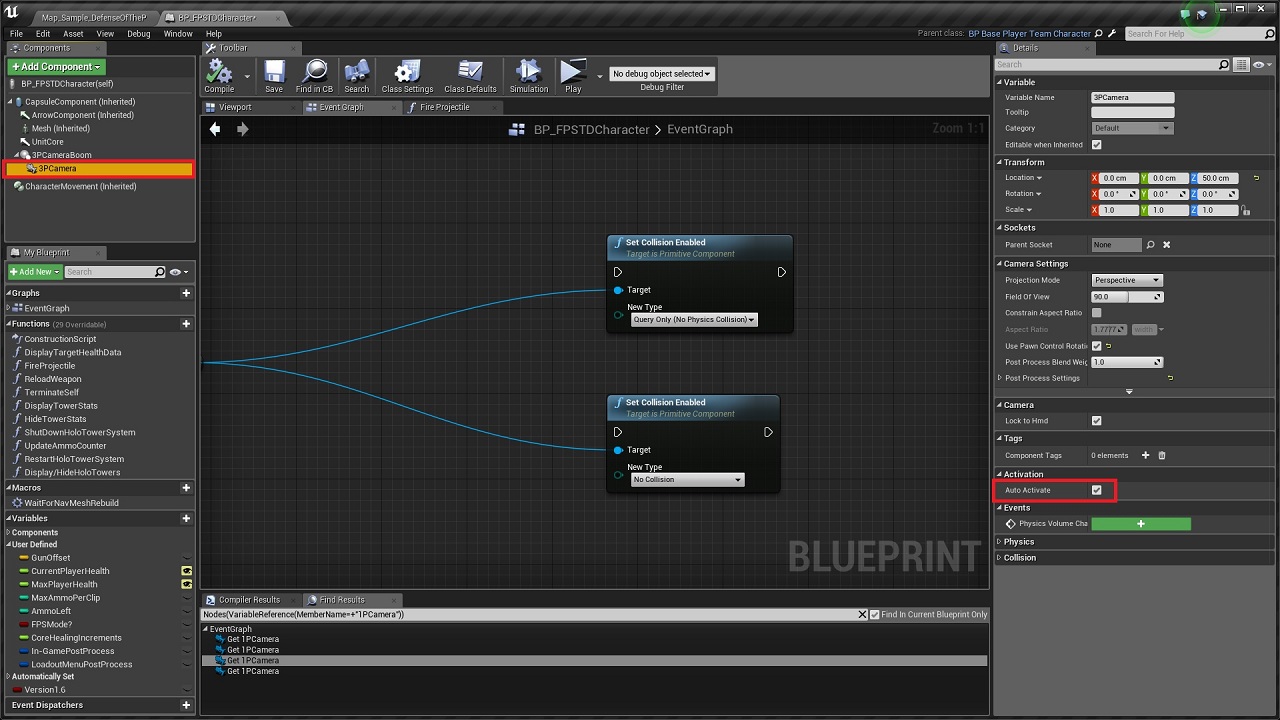
The FPS Tower Defense Toolkit comes with inbuilt support for switching between FPS & TPS [limited animations in TPS] modes. The associated logic lies within the BP_FPSTDCharacter blueprint as shown in the screenshot below: 


However, in order to convert it into a purely TPS project, the following steps will guide you through the process [all changes are to made in the BP_FPSTDTCharacter blueprint]:

1. First remove that 'SwitchCamera' logic marked with the red box in the screenshot. You won't need that if you're only using third person view.

2. Then remove the 'Mesh1P' skeletal mesh component & any references to it within the character blueprint.


3. Replace every instance of '1PCamera' camera component with '3PCamera' camera component & then delete '1PCamera'. Tick the 'Auto Activate' property of '3PCamera'.


4. Now select the 'Mesh' component, & untick the attribute 'Hidden in Game' as shown below:


5. With that, you should be able to get the third person view working. Apart from that, there is only some code clean up to do. So just search for the variable 'FPSMode?' and disconnect the part that's only connected to it's True execution pin.


For more details about the toolkit, check out the official Unreal Engine forums support thread: https://forums.unrealengine.com/showthread.php?79300-FPS-Tower-Defense-Toolkit

Marketplace Product Page: https://www.unrealengine.com/marketplace/fps-tower-defense-toolkit

Tower Defense Starter Kit v1.2 Update Dev Log #1: Artillery Towers

The v1.2 update for Tower Defense Starter Kit will include a new Artillery tower that fires explosive shells to deal area damage at the impact locations. Unlike all the other towers, I decided to have upgrades to the Artillery tower increase the number of explosive shells launched per cycle instead of increasing the damage output per shot.

The Artillery tower blueprint will also enable the user to specify the parameters that influence the projectile path for the shells. You can set it to auto-calculate based on either constant launch angle or constant impact time. 

Constant launch angle is the better option if you always want it to fire upwards before falling upon the target location. If you want the projectile paths to always look like the bomb towers in Kingdom Rush or Sentinel 4, this would be the way to go. It also has checks for height requirements in order to make sure that only paths that lie within the user defined range will be used. 

Setting it to constant time on the other hand, would ensure better predictability, but I don't think that's usually a concern in tower defense games as we don't directly control the towers. It might be more useful in scenarios involving manual control like say, throwing the grenades similar to how it's done in Gears of War. Still there might be use cases that I haven't thought of & hence the feature is available as an alternate mode of firing artillery shells.

Apart from that, there are variables to control the velocity offsets to make sure that the impact locations of the projectiles (especially when two or three are launched at the same time) get randomized around the landing zone.

Here's a short preview video of the Artillery Tower in action:


For more information, check out the official Unreal Engine forum support thread at: https://forums.unrealengine.com/showthread.php?102675-Tower-Defense-Starter-Kit-Support-Thread

Unreal Engine Marketplace Product Page: https://www.unrealengine.com/marketplace/tower-defense-starter-kit

Friday, 29 April 2016

FPS Tower Defense Toolkit: Update VI Change Log

Update VI (v1.6) [Compatible with Unreal Engine v4.11] project files for the FPS Tower Defense Toolkit are now available in the Marketplace. Since this update brings about a lot of changes, both in terms of new features as well as the improvements over the previous v1.5 implementation, the update has been released only for Unreal Engine v4.11. This ensures that anyone who wants to keep using the v1.5 implementation can still download the v4.10 project files from the Marketplace. 

Listed below is a brief overview of the code changes in the update:

- Loadout & Tower Selection menus added to enable tower selection at level start. The list of available towers in the Tower Selection menu are populated dynamically based on the information specified in the Tower Data Array. [Preview video: https://www.youtube.com/watch?v=uqLN_pxcR5k]

- The new Tower Data Array can be used to set the list of available towers for each level as well as basic tower initialization attributes like Tower Cost, Tower Class, etc. This essentially removes the need to keep separate variables & checks for each tower & paves the way for a much more dynamic workflow when other parts like the HUD system are interacting with the Tower Data.

- Blueprint interfaces added to handle resource points management during tower setup/destroy events & grid data retrieval for trace hit actors.

- New HUD class to manage high level HUD state changes.

- Simplified output boost implementation for the Boost Tower.

- Added provision to set the scale [number of digits succeeding the decimal point] for tower stats display in order to prevent clipping of text between widgets.

- All Grid Data updates now handled within the Game State blueprint only.

- Tower upgrades now improve the rate of fire & tower range/resource cap alongside the normal output increase. The improved tower upgrade menu showcases both current stats as well as upgraded stats. [Preview video: https://www.youtube.com/watch?v=jx5lNGws-9k]

- Stats for all offensive towers now display Damage Per Second instead of the regular output per cycle value, thus providing more useful data to the player when interacting with towers.

- The Holographic tower spawn logic has been moved from the Tower Spawn Manager to their respective classes, thus reducing the need for unnecessary checks & improving the code modularity.

- Setter functions implemented to enable variables changes to occur only from within their parent objects.

- Improved code standardization & optimization implemented across all classes.


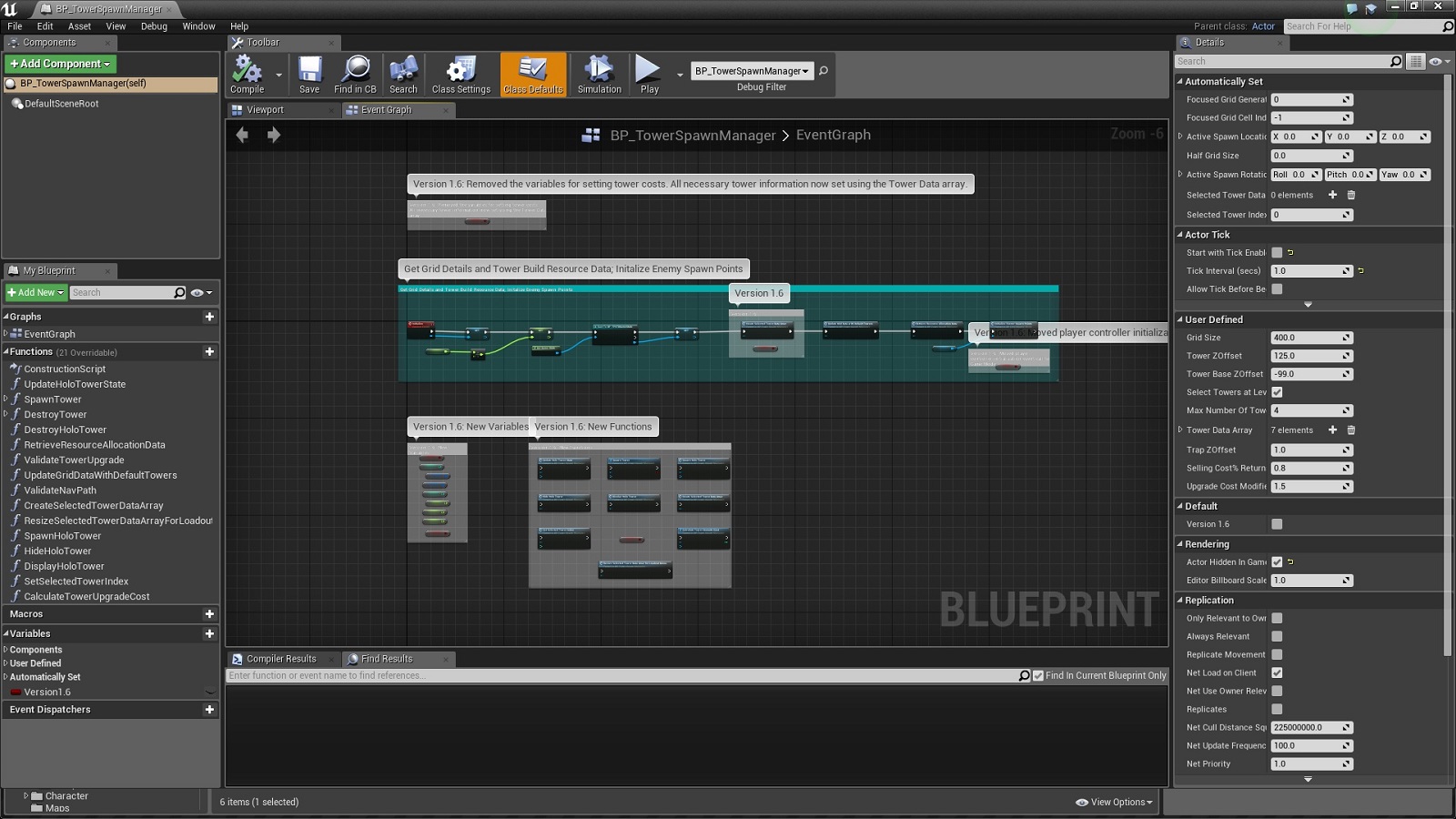
All changes within the blueprints are marked with the boolean variable 'Version1.6' in order to easily identify the workflow changes introduced with this update. Comments are also written to describe the major changes. The new variables as well as functions added to existing blueprints are also marked in the event graph as shown below:


Changes in the Content Browser:

- New enums: EHUDState, EHUDStatsType, ETowerConstructorMenuType & ETowerFunctions.

- New interfaces: BPI_GridLink, BPI_GenericHUDUpdates & BPI_TowerFunctions.

- 'Struct_GridGeneratorData' renamed to 'Struct_GridCellData'.

- 'Struct_MapGridData' renamed to 'Struct_GridData'. New member added to struct.

- 'BP_TowerSpawnHandler' & 'BP_WaveHandler' renamed to 'BP_TowerSpawnManager' & 'BP_WaveManager' respectively.

- New struct: Struct_TowerData.

- New default HUD class added: BP_FPSTDHUD.

- New widgets: Widget_LoadoutMenu, Widget_TowerButton, Widget_TowerListBox & Widget_TowerSelectionMenu.

- Navmesh runtime generation changed from dynamic to dynamic modifiers only.

- BP_PlanarGridGenerator moved to GameplayActors folder.

- Removed 'BP_FloorGridGenerator' & 'BP_WallGridGenerator' blueprints.


For more details, check out the official support thread in the Unreal Engine forums at: https://forums.unrealengine.com/showthread.php?79300-FPS-Tower-Defense-Toolkit

Monday, 25 April 2016

Tower Defense Starter Kit: Update I Change Log

Update I (v1.1) [compatible with Unreal Engine v4.11] project files for the Tower Defense Starter Kit are now available in the Unreal Engine Marketplace. Since this update brings about a lot of changes, both in terms of new features as well as the improvements over the previous v1.0 implementation, the update has been released only for Unreal Engine v4.11. This ensures that anyone who wants to keep using the v1.0 implementation can still download the v4.10 project files from the Marketplace. 

Listed below is a brief overview of the code changes in the update:

- Loadout & Tower Selection menus added to enable tower selection at level start. The list of available towers in the Tower Selection menu are populated dynamically based on the information specified in the new Tower Data Array. [Preview video: https://www.youtube.com/watch?v=uqLN_pxcR5k]

- The new Tower Constructor widget enable dynamic tower construction/function in-game menus [right down to button positions] based on the towers selected by the player as well as the data specified in the Tower Data Array & Tower Functions Array. Since the tower constructor can shift between a Tower Build menu & Tower Functions menu based on the context, this ensures that no HUD changes are required when adding new towers/tower functions as long as the necessary information is specified in the aforementioned struct arrays.

- Data driven tower spawn workflow implemented. Unlike the v1.0 implementation of setting default values within the tower blueprints, this new implementation showcases how to use data stored in struct arrays to control the attributes of the towers. By having all the data in the Tower Data Array, the Tower Manager acts as a central HUB for setting all user defined attributes for towers.

- New towers: Mining tower. The Mining tower harvests resources at regular intervals until the resource pool gets exhausted. Both the resource cap as well as the harvest rate can be increased through tower upgrades.

- The new modular target stats widgets can dynamically alter themselves to display relevant information about the focused/selected target based on a combination of data retrieved from struct arrays as well as the new interface functions.

- Blueprint interfaces added to handle tower functions like upgrade/sell features & target stats display.

- New HUD class to manage high level HUD state changes.

- Simplified output boost implementation for the Boost Tower.

- Added provision to set the scale [number of digits succeeding the decimal point] for target stats display in order to prevent clipping of text between widgets.

- All Grid Data updates now handled within the Game State blueprint only.

- Added level boundaries to prevent camera from going offscreen. [thanks to tanka2d for pointing out the issue]

- Tower upgrades now improve the rate of fire & tower range/resource cap alongside the normal output increase.

- Stats for all offensive towers now display Damage Per Second instead of the regular output per cycle value, thus providing more useful data to the player when interacting with towers.

- Setter functions implemented to enable variables changes to occur only from within their parent objects.

- Improved code standardization & optimization implemented across all classes.


All changes within the blueprints are marked with the boolean variable 'Version1.1' in order to easily identify the workflow changes introduced with this update. Comments are also written to describe the major changes. The new variables as well as functions added to existing blueprints are also marked in the event graph as shown below:


Changes in the Content Browser:

- New enums: EHUDState, EHUDStatsType, ETowerConstructorMenuType & ETowerFunctions.

- Enum EEnemyType renamed to ECreepType.

- Member name changes/additions in the enums ENavType & ETowerType.

- 'BP_BulletProjectiles' blueprint moved to 'GameplayActors' folder.

- 'BP_GridCellHighlighter' renamed to 'BP_GridCellDetector'.

- New interfaces: BPI_GridLink & BPI_TowerFunctions.

- New functions within the interface 'BPI_UpdateHUDStats'.

- 'Struct_GridGeneratorData' renamed to 'Struct_GridCellData'.

- 'Struct_MapGridData' renamed to 'Struct_GridData'. New member added to struct.

- New structs: Struct_HUDStats, Struct_TowerData & Struct_TowerFunctions.

- New tower: BP_MiningTower.

- New default HUD class added: BP_PlayerHUD.

- New widgets: Widget_LoadoutMenu, Widget_SelectionButton, Widget_TargetInformation, Widget_TowerBuildButton, Widget_TowerConstructor, Widget_TowerFunctionsButton, Widget_TowerListBox & Widget_TowerSelectionMenu.

- Renamed 'WidgetBP_EnemyTypeData' to 'Widget_Stats'.


- New static mesh: 'SM_MiningTower'.


For more details, check out the official support thread in the Unreal Engine forums at: https://forums.unrealengine.com/showthread.php?102675-Tower-Defense-Starter-Kit-Support-Thread