Wednesday, 18 May 2016

Top Down Stealth Toolkit v1.1 Documentation

The v1.1 update for the Top Down Stealth Toolkit is now live on the Unreal Engine Marketplace. Listed below is a brief documentation of all the blueprint classes that make up the toolkit. For more information, check out the official support thread in the Unreal Engine forums at: https://forums.unrealengine.com/showthread.php?97156-Top-Down-Stealth-Toolkit

BP_PlayerCharacter: 

The player character class handles all the input logic for the toolkit. Core functionalities include character movement & sprint/stamina mechanics, contextual footstep noises, gadget activations, & aiming assists for gadgets that require manual target confirmations.

BP_PlayerController: 

The player controller class is responsible for creation/deletion of high level HUD widgets as well as runtime HUD updates for mission timers. gadget buttons, etc. It also handles spawning of Aim Plane actor that is used for accurate cursor positioning for aim assists.

BP_PlayerHUD: 

Initiates high level HUD state changes.

BP_TDSTGameInstance: 

Stores information about the gadgets.

BP_TDST_GameMode: 

The game mode class handles functions that keep track of gem collection, spawning of the Exit Point actors as well as the End Game logic. It also has optional support for activating vision arc optimizations, since having a lot of dynamically updating vision arcs is quite expensive. It is best to use the optimization features only if performance issues are evident as the cost of running this feature otherwise could reduce the performance slightly.

BP_PatrolAI_Parent: 

The base class for AI patrol bots & parent class of BP_PatrolAI_Melee & BP_PatrolAI_Ranged. This class handles state changes & operational cost levels, while the linked Behavior Tree handles sensory input management. Other inbuilt functions include patrol waypoint calculations as well as updates to alert meters, both direct & peripheral. It also uses AI Perception to detect sounds & other default components to display bot state & peripheral alert status, while a custom vision arc component handles dynamic updates to the vision arc.

BP_PatrolAI_Melee & BP_PatrolAI_Ranged: 

The melee class does not contain any additional threat detection/management logic apart from what it derives from the parent class, while the ranged class uses a custom laser tracker component to lock on to targets.

BP_AIController_PatrolAI: 

Initializes the Behavior Tree & updates the blackboard values at runtime based on the bot state changes in BP_PatrolAI_Parent class.

BT_PatrolEnemyAI & BB_PatrolEnemyAI: 

Handles the patrol bot behavior through various tasks & blackboard data based on the activation of different bot states. Also contains service to handle threat detection.

BTS_VisionCheck: 

Handles threat detection logic for patrol bots by searching for player character at regular intervals & evaluating if it's within the direct or peripheral vision range. Uses distance, angular & line trace checks along with the hearing sense data from the AI perception component to determine the control bot states.

BTT_TakeAimAtTarget: 

Activate laser tracking system for ranged bots to lock on to the active target.

BTT_CallEndGameLogic: 

Calls the end game logic from the Game Mode.

BTT_EndCurrentPatrolCycle: 

Ends active patrol cycle based on the patrol movement type.

BTT_ExecutePatrolMovement: 

Issues move order to patrol bots based on the associated movement type.

BTT_MoveToTargetLocation: 

Used by patrol bots to move to suspicious locations in investigation mode.

BTT_InspectCurrentLocation: 

Used by patrol bots in investigation/alarmed state to search around a suspicious location. The number of sweep searches as well as speed can be changed easily by adjusting the parameters for the same.

BTT_KeepTargetInFocus: 

Keeps the bot focused on the active target

BTT_SetActiveThreat: 

Updates the blackboard value to store information about a new target.

BTT_SetNewPatrolLocation: 

Calculates next patrol waypoint & sets target point actor at the location.

BTT_SetNewTargetLocation: 

Set target point actor at target location & updates the blackboard with the new information.

BP_StationaryAI_Parent: 

The base class for stationary AI bots & parent class of BP_StationaryAI_Camera & BP_StationaryAI_Turret. This class handles threat detection, state changes & operational cost levels, while leaving the behavior of the bot during different states, to the child classes. Similar to the patrol bots, the stationary bots also use a custom vision arc component that dynamically updates the vision arc based on overlapping obstacles.

BP_StationaryAI_Camera: 

Handles surveillance movement for the camera bots. Also contains functionality to alarm nearby patrol guards, once it detects a potential target.

BP_StationaryAI_Turret: 

Uses an automated laser tracker component to lock on to targets.

BPC_AutomatedLaserTracker: 

Custom component used by ranged offensive AI bots to lock on to a single target before firing a shot. Laser beam emitter used to display los to the target.

BPC_VisionArcVertexManager: 

Custom component used by actors that require a Vision Arc. This component updates the individual vertices of the custom mesh components that make up the Vision Arc based on the obstacles in parent actor's vision range.

BP_AimPlane: 

This actor is spawned at level start to retrieve the cursor location at positions higher than ground level (the normal hit result location) so as to provide the player with an accurate aiming assist while using gadgets that require manual targeting with the cursor. Does not contain any code within itself.

BP_AlarmTarget: 

Disposable actor used by AI bots to trigger a noise alarm that attracts nearby AI bots to the actor's location.

BP_ExitPoint: 

The Exit Point serves as the final objective for the player and gets activated by the Game Mode once the player has collected all the gems scattered throughout the level. Uses collision overlap to call end game logic.

BP_Gems: 

Collectible actors that can be placed around the level and serves as one of the primary objectives of the game. The Game Mode keeps track of the collected gems as well as the total number of gems in the level & activates exit point based on this information. Uses basic overlap events to update the HUD & game mode once a gem is collected by the player.

BP_VisionArcOptimizer: 

Determines if the vision arcs need to be rendered based on whether they're on screen or not. Can provide a significant performance boost if there are many actors with vision arcs in the level.

BP_WaypointNode: 

Used as anchor points for pathing when movement type of patrol bots are set to 'FixedWaypoints'. Does not contain any relevant code within itself.

BP_ProximityShockMine: 

Deployable gadget that uses basic collision overlap to temporarily deactivate the first patrol bot that ventures too close to the actor. Destroys itself once used up.

AnimBP_Parent & AnimBP_PatrolAI: 

Basic animation updates based on the character velocity.

AnimBP_Player: 

Basic animation updates based on the character velocity plus anim notifies to handle footstep noises while running.

BPI_TargetLockOnSystem: 

Interface implemented by actors that use the Automated Laser Tracker component.

BPI_VisionArc: 

Interface implemented by actors that use Vision Arc Vertex Manager component.

Widget_TopDownHUD: 

The Top Down HUD handles all the major in-game HUD updates including HUD updates for stamina bar, gem collection stats, whistle & gadget button activations/state changes.

Widget_GameOverHUD: 

Handles the end game UI interactions. Supports game restart & quit to desktop functionalities.

Widget_LoadoutMenu: 

The Loadout menu enables the player to select a gadget from a list of all the gadgets specified in the gadget data array before starting the level.

Widget_GadgetsGridPanel:

Modular container panel that displays all the gadgets using a custom grid panel. It dynamically adjusts it's position & size based on the number of gadgets as well as set of parameters defined by the designer.

Widget_GadgetSelectionButton:

Enables selection of a gadget based on the associated button index within the Gadgets Data Array.

Sunday, 15 May 2016

Top Down Stealth Toolkit v1.2 Update Dev Log #2: Mission Timers & Persistent High Scores

I've been thinking about adding some new features to the End Game HUD apart from the default 'Restart' & 'Exit' options. So it seemed like a sensible option to include time stats for the mission. It could also serve as a lightweight tutorial of sorts for how to implement basic save game functionality, as the high score would have to be retrieved & edited across multiple instances of the game. So basically, new data gets displayed & saved based on comparison between the values of new completion time for the level as well as any existing high scores. Here's a preview screenshot for the same:


The time stats are automatically hidden if the player fails to complete the level, thus leaving only the restart & exit options. Apart from that, the main Top Down HUD also displays the mission timer so that players can keep track of the current status of the game.


That's all for this post. I'm planning to add a few more features over the next couple of days before submitting the update to the marketplace. Nothing major, just a few small feature requests that I've received. I don't want this update to make too many changes to the vanilla 4.11 version as the files are essentially getting replaced unlike the previous update where the updated files were made exclusively through 4.11 version without impacting the 4.10 project files.

Friday, 13 May 2016

Top Down Stealth Toolkit v1.2 Update Dev Log #1: Laser Security Systems

The v1.2 update for Top Down Stealth Toolkit will feature a new Laser Security system that can alert nearby patrol bots upon being intercepted by the player character. 

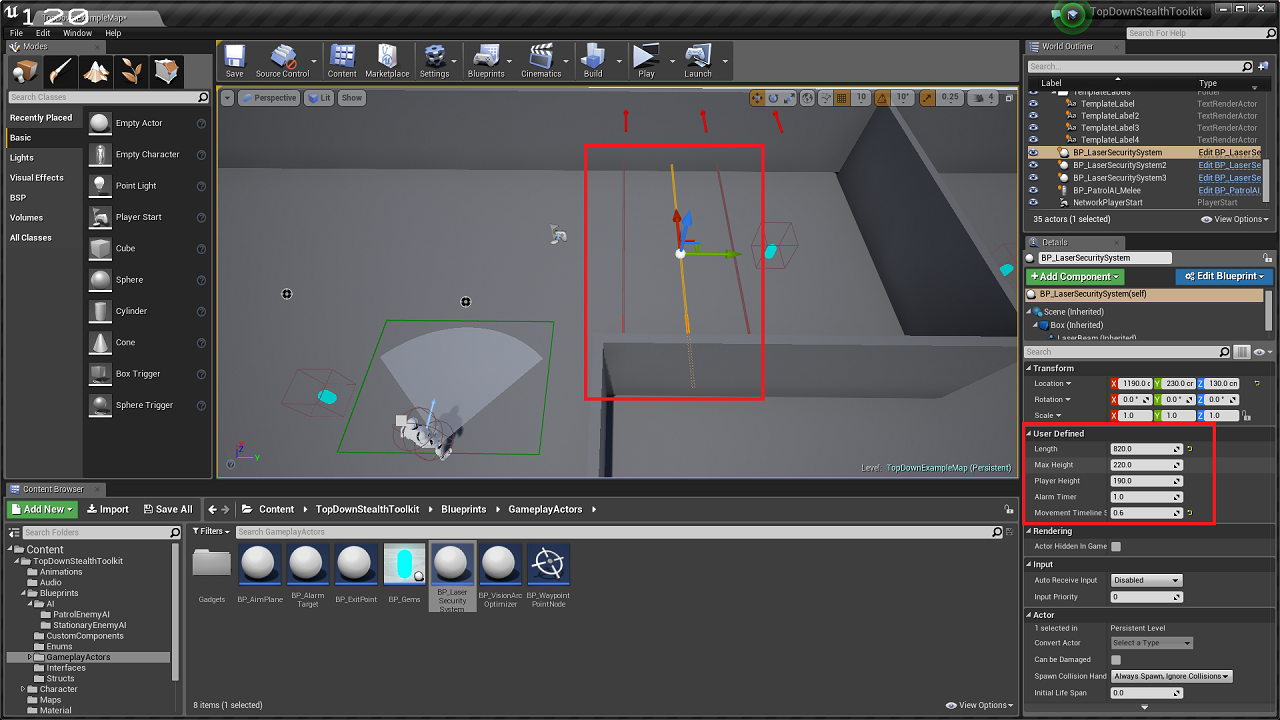
The user can specify the length, max height, starting laser position, etc directly through publicly exposed variables [screenshot below; variables names subject to change] to easily change the properties of individual actors in the scene. The max height of the player character can also be set to change the color of the laser accordingly, thus providing the player with the tools to time their decisions.


Since the camera & turret AI already showcase how to use direct math calculation & interp to enable both passive surveillance as well as active lock on systems, I decided to use timelines here to drive the laser movement. It's an easy setup, that uses the same Alarm Target actors that are used by camera bots to trigger alarms.


Here's a preview video of the Laser Security systems in action:


For more information, check out the official unreal engine forum support thread at: https://forums.unrealengine.com/showthread.php?97156-Top-Down-Stealth-Toolkit

Unreal Engine Marketplace Product Page: https://www.unrealengine.com/marketplace/top-down-stealth-toolkit

Wednesday, 11 May 2016

Top Down Stealth Toolkit FAQ #1

Q: I replaced the default skeletal mesh of the player character with a mixamo character mesh. And now I cannot see the footstep rings when the character is running. How do I fix this?

A: Since you're using a mixamo character, I think it's using the mixamo animation blueprint instead of the animation blueprint used the by the default character. The footstep rings are called from the animation blueprint, so you'll have to copy that code to the mixamo character's animation blueprint. You can follow the step detailed below to get the footstep rings working:

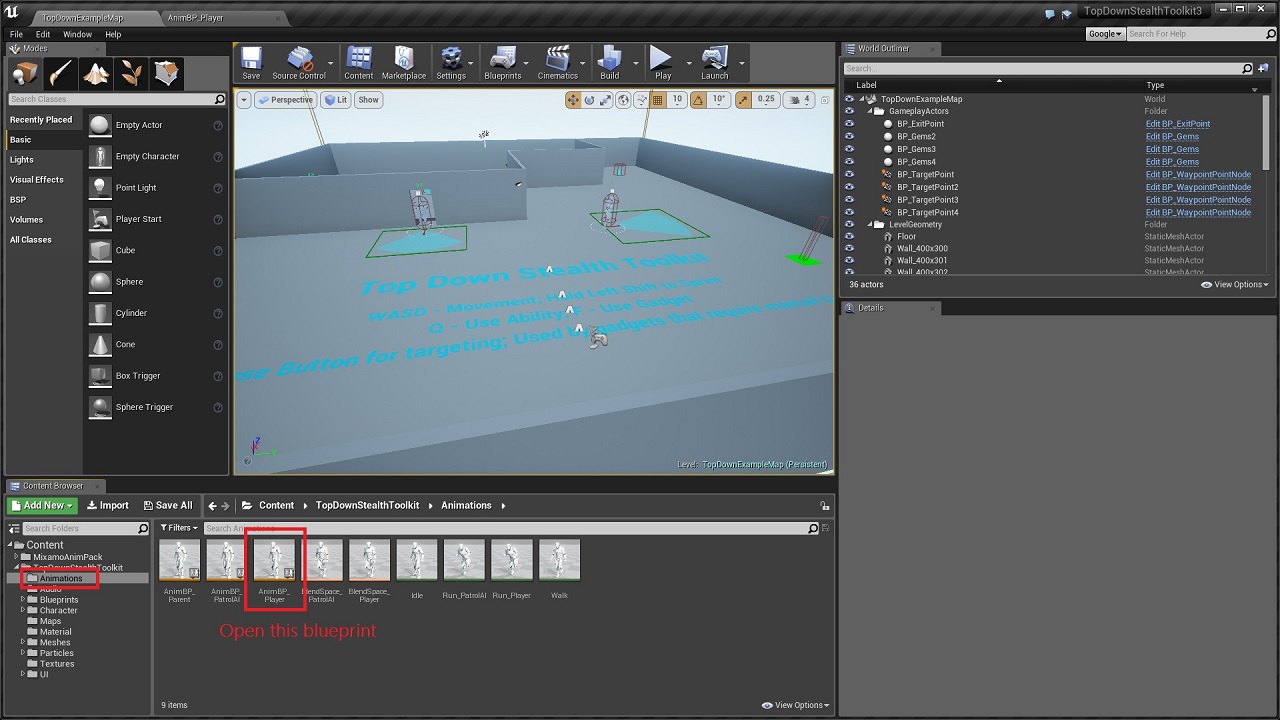
1. Open the 'AnimBP_Player' under the animations folder.


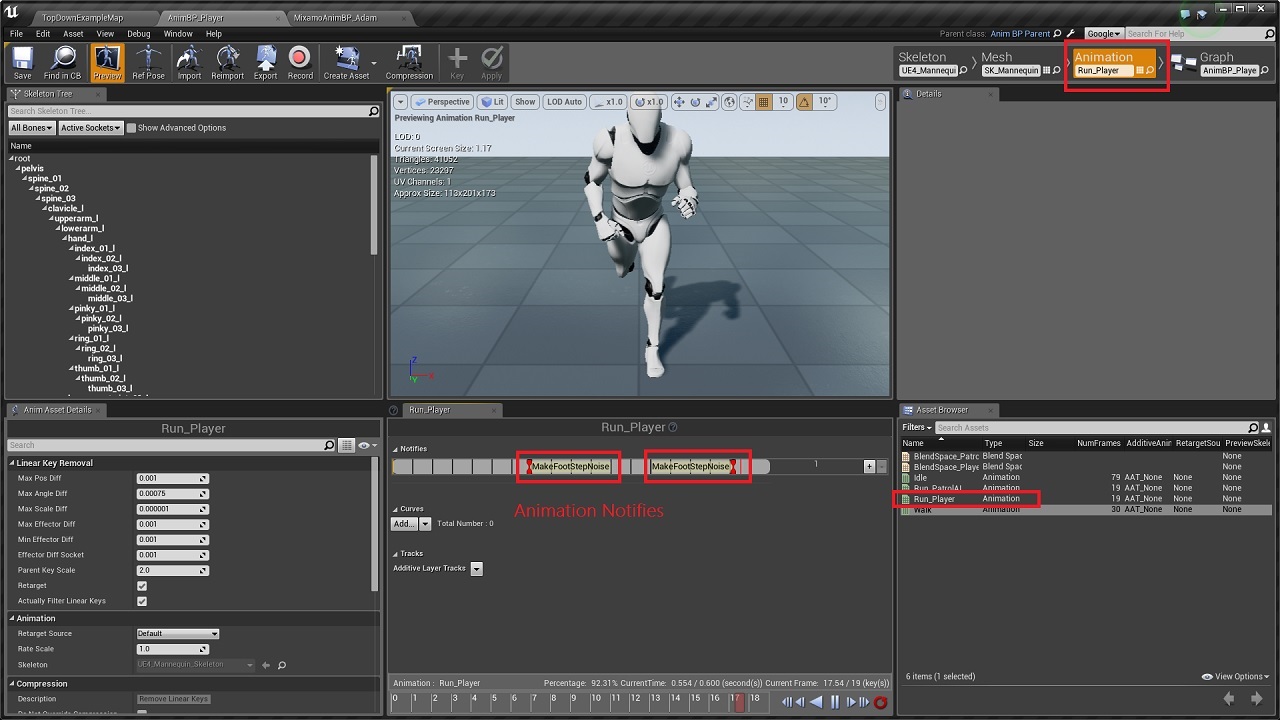
2. Under the Animation tab, double click on the 'Run_Player' animation. You will notice that there are two red markers along the animation track. These are notify events that get triggered everytime the animation reaches the point where a feet touches the ground. So we have one each for left & right foot for a single cycle of the run animation.


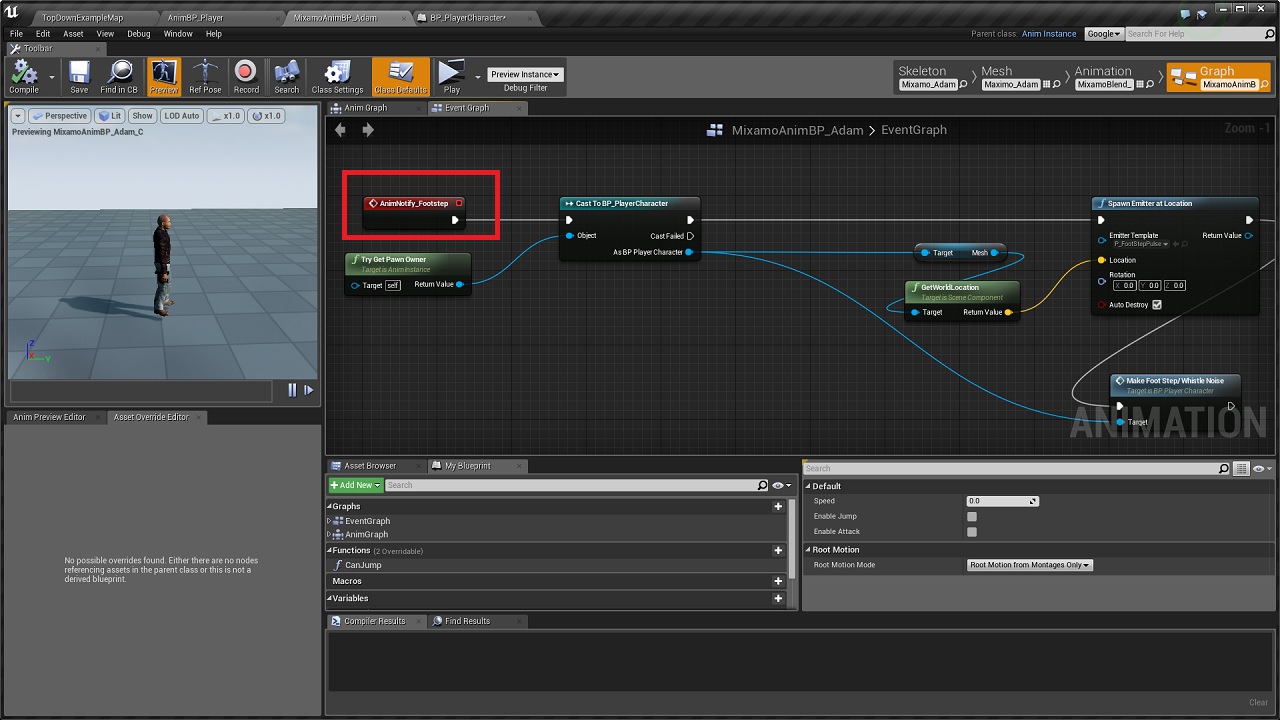
3. Now if you go to the Anim Graph for the same blueprint, you will notice that I've added the anim notify event for footstep noise. This event gets triggered from the anim notifies we placed along the run animation. So using this event, we spawn the ring particle for footstep & then call the 'Make Footstep/Whistle Noise' from player character blueprint.


Now we'll implement the same in Adam's animation blueprint.


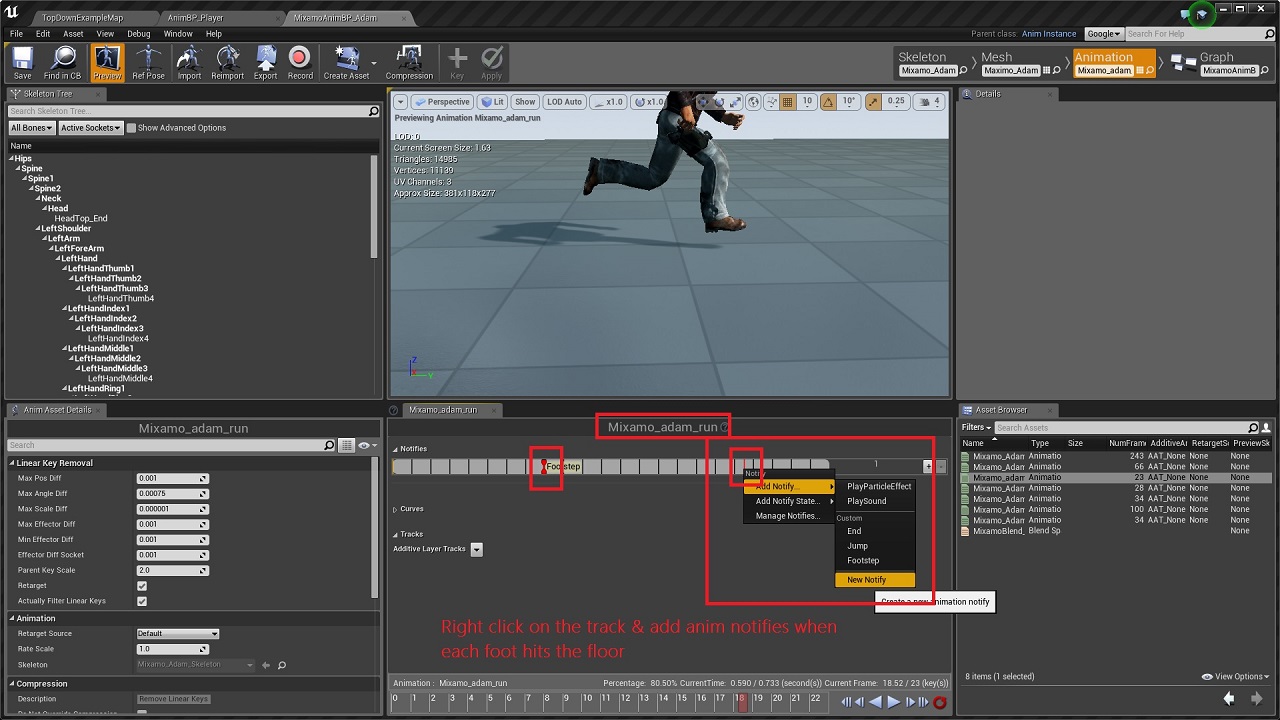
4. So within the Animation Tab of Adam Animation BP, double click on the run animation. Now right click on the track & add a new anim notify when the first foot hits the ground. Then add the same notify again later down the track when the other foot hits the ground. With that, we have the anim notifies set up everytime the feet hits the floor.


5. Now we need to go to the Anim Graph of the same blueprint & call the notify event. Right click anywhere on the graph & type in the name of the notify that you had given in the previous step. I gave the name 'FootStep' for the notifies, so m event will be named automatically as 'AnimNotify_Footstep'. Add the event in the graph & copy the particle spawn & foot step noise code into this.


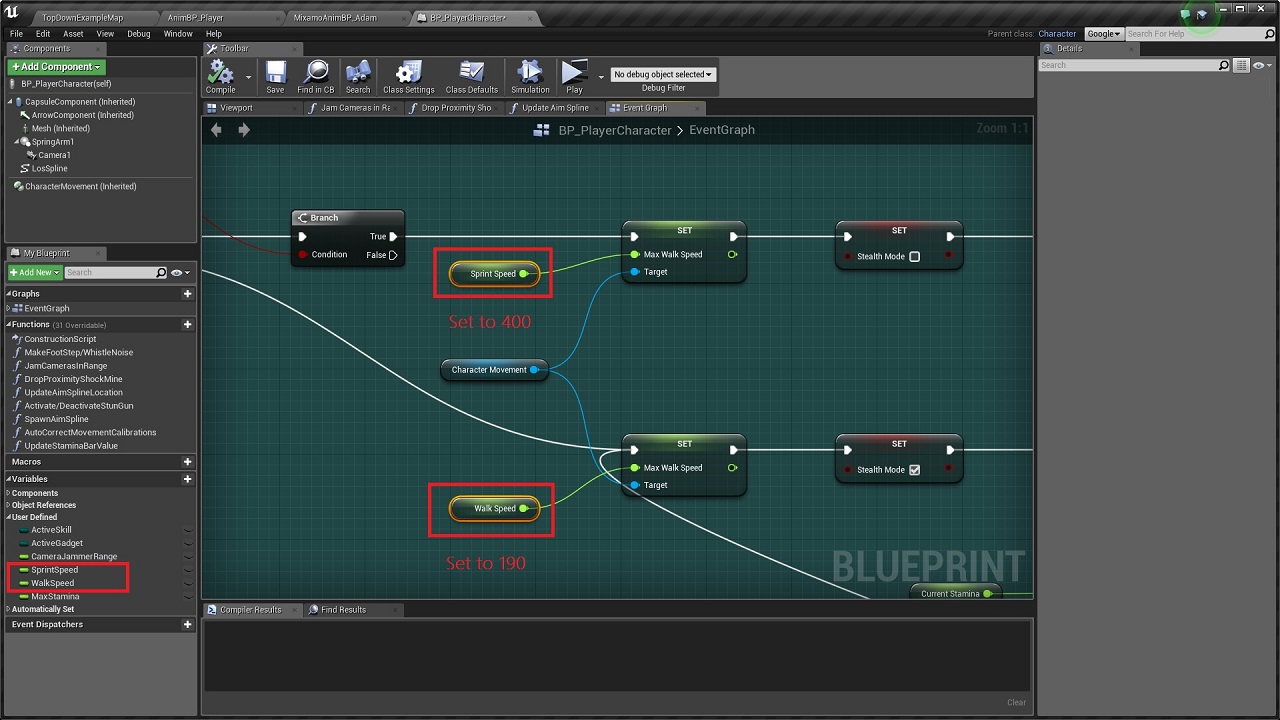
6. Now within the Animation tab for Adam, if you check out the blend space, you will notice that the speed ranges from 0 to 400. 


So now we just need to set the walk and sprint speed for our player character in the 0 to 400 range. So go to 'BP_PlayerCharacter' & set the 'WalkSpeed' variable to 190 & 'SprintSpeed' variable to 400. 


With that, you should be able to get the footstep rings working.


For more information about the toolkit, check out the official Unreal Engine forum support thread at: https://forums.unrealengine.com/showthread.php?97156-Top-Down-Stealth-Toolkit

Tower Defense Starter Kit v1.2 Update Dev Log #2: Level Selection Menu

Apart from the Artillery Tower mentioned in an earlier post [Link: http://unrealpossibilities.blogspot.in/2016/05/tower-defense-starter-kit-v12-update.html], the other new feature that will be available in the v1.2 update for Tower Defense Starter Kit is a Level Selection Menu. With this new system, the player can choose from any of the unlocked levels in the project when starting a game. As the player progresses through the campaign, more levels will get unlocked automatically which then gets reflected in the menu & remains persistent throughout subsequent instances of the game. The player can also choose between the default campaign mode or the endless mode before starting a level.

The list of levels as well as information about the selected level are displayed dynamically at runtime based on the information specified in the Level Data Array by the designer as well as the changes that have been made to it throughout later instances of the game. The dynamic nature of the menu system enable the developers to add new levels & the associated information into the Level Data Array without worrying about handmade changes to the HUD.

Moving on to the specifics, the unlocked levels are listed using a scrollbox that uses custom widgets as it's children, while the level information showcases how to use vertical boxes to display UI elements. Apart from the Level Selection Menu, I've added a very minimalist Main Menu as well as some improvements to the End Game HUD. The End Game HUD is now neatly structured using a vertical box which dynamically alters itself based on the end result of the current level. For example, the Continue button is displayed only when the following conditions are satisfied: the player has completed the current level; & there are further levels to unlock after the current level. An additional option has also been added to return to the Main Menu from the End Game HUD.

Here's a short preview video of the Level Selection Menu:


For more information, check out the official unreal engine forum support thread at: https://forums.unrealengine.com/showthread.php?102675-Tower-Defense-Starter-Kit-Support-Thread

Thursday, 5 May 2016

FPS Tower Defense Toolkit Tutorial #1: How to convert this into a TPS project

The FPS Tower Defense Toolkit comes with inbuilt support for switching between FPS & TPS [limited animations in TPS] modes. The associated logic lies within the BP_FPSTDCharacter blueprint as shown in the screenshot below: 


However, in order to convert it into a purely TPS project, the following steps will guide you through the process [all changes are to made in the BP_FPSTDTCharacter blueprint]:

1. First remove that 'SwitchCamera' logic marked with the red box in the screenshot. You won't need that if you're only using third person view.

2. Then remove the 'Mesh1P' skeletal mesh component & any references to it within the character blueprint.


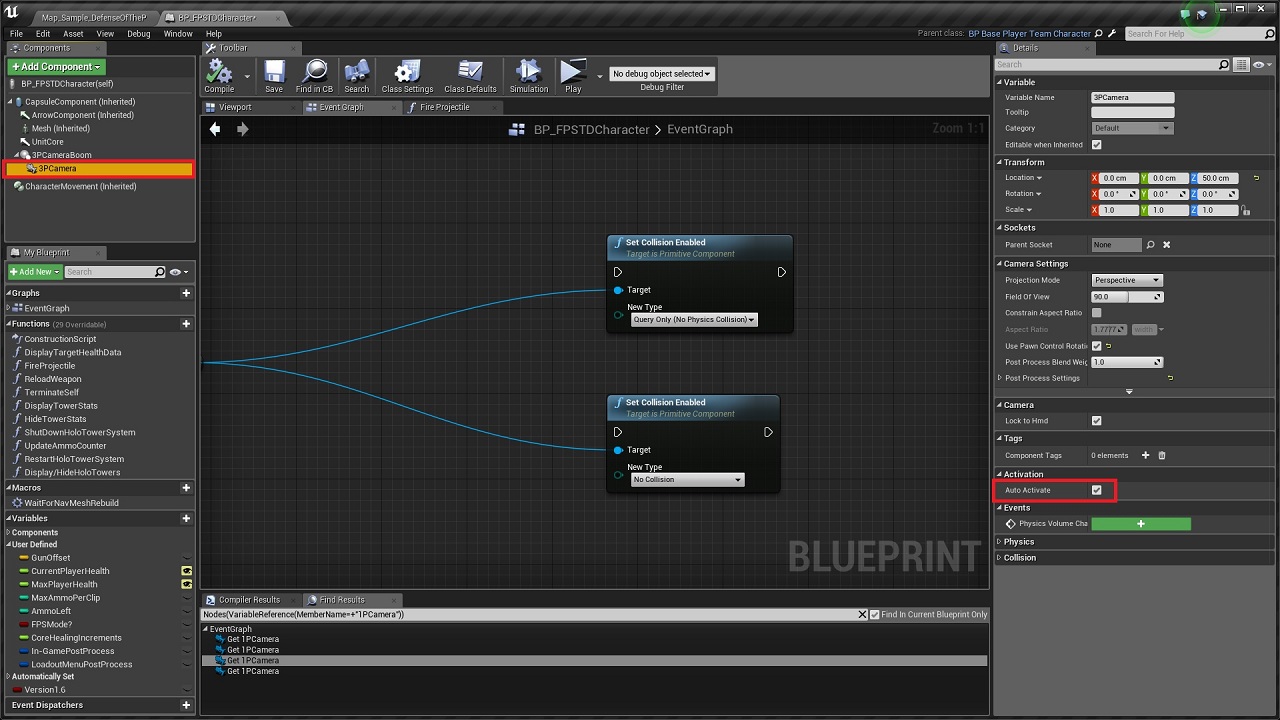
3. Replace every instance of '1PCamera' camera component with '3PCamera' camera component & then delete '1PCamera'. Tick the 'Auto Activate' property of '3PCamera'.


4. Now select the 'Mesh' component, & untick the attribute 'Hidden in Game' as shown below:


5. With that, you should be able to get the third person view working. Apart from that, there is only some code clean up to do. So just search for the variable 'FPSMode?' and disconnect the part that's only connected to it's True execution pin.


For more details about the toolkit, check out the official Unreal Engine forums support thread: https://forums.unrealengine.com/showthread.php?79300-FPS-Tower-Defense-Toolkit

Marketplace Product Page: https://www.unrealengine.com/marketplace/fps-tower-defense-toolkit

Tower Defense Starter Kit v1.2 Update Dev Log #1: Artillery Towers

The v1.2 update for Tower Defense Starter Kit will include a new Artillery tower that fires explosive shells to deal area damage at the impact locations. Unlike all the other towers, I decided to have upgrades to the Artillery tower increase the number of explosive shells launched per cycle instead of increasing the damage output per shot.

The Artillery tower blueprint will also enable the user to specify the parameters that influence the projectile path for the shells. You can set it to auto-calculate based on either constant launch angle or constant impact time. 

Constant launch angle is the better option if you always want it to fire upwards before falling upon the target location. If you want the projectile paths to always look like the bomb towers in Kingdom Rush or Sentinel 4, this would be the way to go. It also has checks for height requirements in order to make sure that only paths that lie within the user defined range will be used. 

Setting it to constant time on the other hand, would ensure better predictability, but I don't think that's usually a concern in tower defense games as we don't directly control the towers. It might be more useful in scenarios involving manual control like say, throwing the grenades similar to how it's done in Gears of War. Still there might be use cases that I haven't thought of & hence the feature is available as an alternate mode of firing artillery shells.

Apart from that, there are variables to control the velocity offsets to make sure that the impact locations of the projectiles (especially when two or three are launched at the same time) get randomized around the landing zone.

Here's a short preview video of the Artillery Tower in action:


For more information, check out the official Unreal Engine forum support thread at: https://forums.unrealengine.com/showthread.php?102675-Tower-Defense-Starter-Kit-Support-Thread

Unreal Engine Marketplace Product Page: https://www.unrealengine.com/marketplace/tower-defense-starter-kit

Friday, 29 April 2016

Top Down Stealth Toolkit: Update I Change Log

Update I (v1.1) [Compatible with Unreal Engine v4.11] project files for the Top Down Stealth Toolkit are now available in the Marketplace. Since this update brings about a lot of changes, both in terms of new features as well as the improvements over the previous v1.0 implementation, the update has been released only for Unreal Engine v4.11. This ensures that anyone who wants to keep using the v1.0 implementation can still download the v4.10 project files from the Marketplace. 

Listed below is a brief overview of the code changes in the update:

- Dynamic Vision Arcs & Laser Tracking system are now implemented through the use of custom components & interfaces. The component based design provides improved modularity & enables easy attachment to different classes.

- Added Turret Bot AI. Uses the new Laser Tracking component to acquire & lock on to targets. [Preview Video: https://www.youtube.com/watch?v=9uOBp0Tnk34]

- Gadget Selection menu at level start enable players to select custom loadouts. Gadgets populated as HUD elements dynamically based on information specified in the Gadget Data Array. [Preview Video: https://www.youtube.com/watch?v=1FJeg6V7iek]

- The new Gadget Data Array controls the important parameters of all available gadgets from a central location.

- The Camera Bot now triggers timed alarm loops instead of single alarm as long as player character is within vision range.

- Replaced Camera Jammer with an EMP that can temporarily deactivate both camera & turret bots.

- Laser Tracking component added to Ranged Patrol bot to improve over the existing targeting system.

- Improved aesthetic feedback for peripheral range display. The peripheral range display changes color from white (default) to red based on peripheral alert level, replacing the text render that displayed peripheral threat counter.

- The patrol bots can now distinguish between different types of noises & handle decision priorities accordingly. Alarm sounds receive higher priority compared to footstep & whistle sounds.

- Added new suspicious & alarmed states for the patrol bots to create a more realistic design for state changes.

- The new Vision Arc Optimizer actor provides performance boost by removing rendering calculations for arcs outside the screenspace.

- Added dynamic operational cost levels enable AI to turn on/off expensive calculations like vision arc updates & threat detection logic on the move based on the requirements.

- Setter functions implemented to enable variables changes to occur only from within their parent objects.

- Improved code standardization & optimization implemented across all classes.


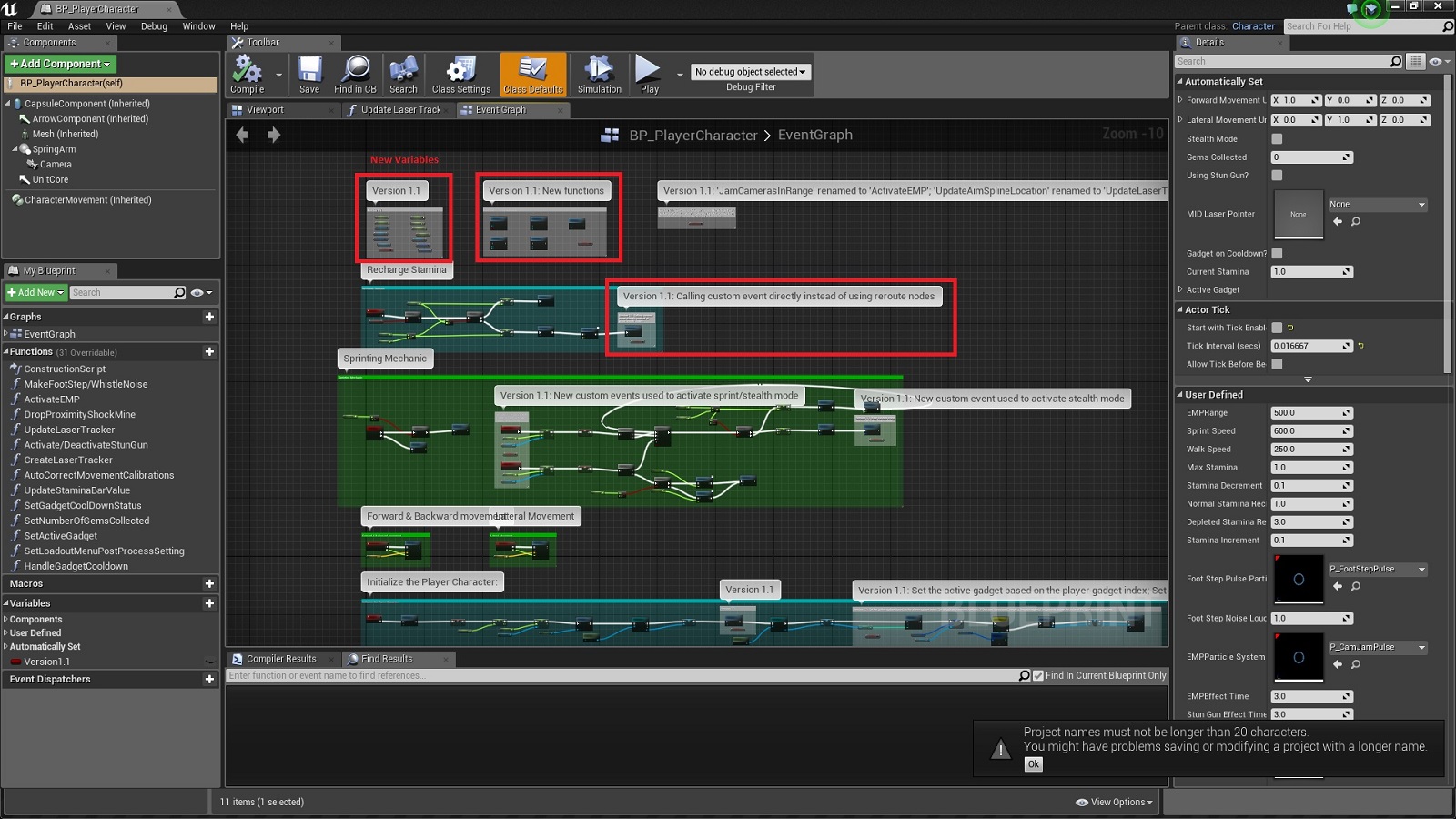
All changes within the blueprints are marked with the boolean variable 'Version1.1' in order to easily identify the workflow changes introduced with this update. Comments are also written to describe the major changes. The new variables as well as functions added to existing blueprints are also marked in the event graph as shown below:


Changes in the Content Browser:

- New default HUD class added: BP_PlayerHUD.

- New default Game Instance class added: BP_TDSTGameInstance.

- Removed BP_EnemyAI_Parent class.

- Added new stationary enemy AI class: BP_StationaryAI_Turret.

- BT_PatrolEnemyAI, & BTT_SearchCurrentLocation renamed to 'BT_PatrolAI', BTT_SetNewPatrolLocation & BTT_InspectCurrentLocation respectively.

- Removed BT Tasks BTT_AimAtPlayer & BTT_ExecutePatrolMovement.

- Added new BT Tasks BTT_KeepTargetInFocus, BTT_SetActiveThreat, BTT_SetNewPatrolLocation, BTT_SetNewTargetLocation & BTT_TakeAimAtTarget.

- BP_StationaryEnemyAI_Camera & BP_StationaryEnemyAI_Parent renamed to BP_StationaryAI_Camera & BP_StationaryAI_Parent respectively.

- Added new custom components: BPC_AutomatedLaserTracker & BPC_VisionArcVertexManager.

- Added new enums: EHUDState, ENoiseType & EOperationCostLevel.

- Removed enum Enum_PlayerSkills.

- Added new class BP_VisionArcOptimizer.

- Added new widgets: Widget_GadgetSelectionButton, Widget_GadgetsGridPanel & Widget_LoadoutMenu.

- 'BB_PatrolEnemyAI', 'BP_AIController_PatrolEnemyAI, 'BP_PatrolEnemyAI_Melee, BP_PatrolEnemyAI_Parent, & BP_PatrolEnemyAI_Ranged renamed to BB_PatrolAI, BP_AIController_PatrolAI, BP_PatrolAI_Melee, BP_PatrolAI_Parent, & BP_PatrolAI_Ranged respectively.

- Enum_PatrolAIClass, Enum_PatrolAIState, Enum_PatrolType, Enum_PlayerGadgets, Enum_StationaryAIClass & Enum_StationaryAIState renamed to EPatrolAIClass, EPatrolAIState, EPatrolType, EGadgets, EStationaryAIClass & EStationaryAIState respectively.


For more details, check out the official support thread in the Unreal Engine forums at: https://forums.unrealengine.com/showthread.php?97156-Top-Down-Stealth-Toolkit

FPS Tower Defense Toolkit: Update VI Change Log

Update VI (v1.6) [Compatible with Unreal Engine v4.11] project files for the FPS Tower Defense Toolkit are now available in the Marketplace. Since this update brings about a lot of changes, both in terms of new features as well as the improvements over the previous v1.5 implementation, the update has been released only for Unreal Engine v4.11. This ensures that anyone who wants to keep using the v1.5 implementation can still download the v4.10 project files from the Marketplace. 

Listed below is a brief overview of the code changes in the update:

- Loadout & Tower Selection menus added to enable tower selection at level start. The list of available towers in the Tower Selection menu are populated dynamically based on the information specified in the Tower Data Array. [Preview video: https://www.youtube.com/watch?v=uqLN_pxcR5k]

- The new Tower Data Array can be used to set the list of available towers for each level as well as basic tower initialization attributes like Tower Cost, Tower Class, etc. This essentially removes the need to keep separate variables & checks for each tower & paves the way for a much more dynamic workflow when other parts like the HUD system are interacting with the Tower Data.

- Blueprint interfaces added to handle resource points management during tower setup/destroy events & grid data retrieval for trace hit actors.

- New HUD class to manage high level HUD state changes.

- Simplified output boost implementation for the Boost Tower.

- Added provision to set the scale [number of digits succeeding the decimal point] for tower stats display in order to prevent clipping of text between widgets.

- All Grid Data updates now handled within the Game State blueprint only.

- Tower upgrades now improve the rate of fire & tower range/resource cap alongside the normal output increase. The improved tower upgrade menu showcases both current stats as well as upgraded stats. [Preview video: https://www.youtube.com/watch?v=jx5lNGws-9k]

- Stats for all offensive towers now display Damage Per Second instead of the regular output per cycle value, thus providing more useful data to the player when interacting with towers.

- The Holographic tower spawn logic has been moved from the Tower Spawn Manager to their respective classes, thus reducing the need for unnecessary checks & improving the code modularity.

- Setter functions implemented to enable variables changes to occur only from within their parent objects.

- Improved code standardization & optimization implemented across all classes.


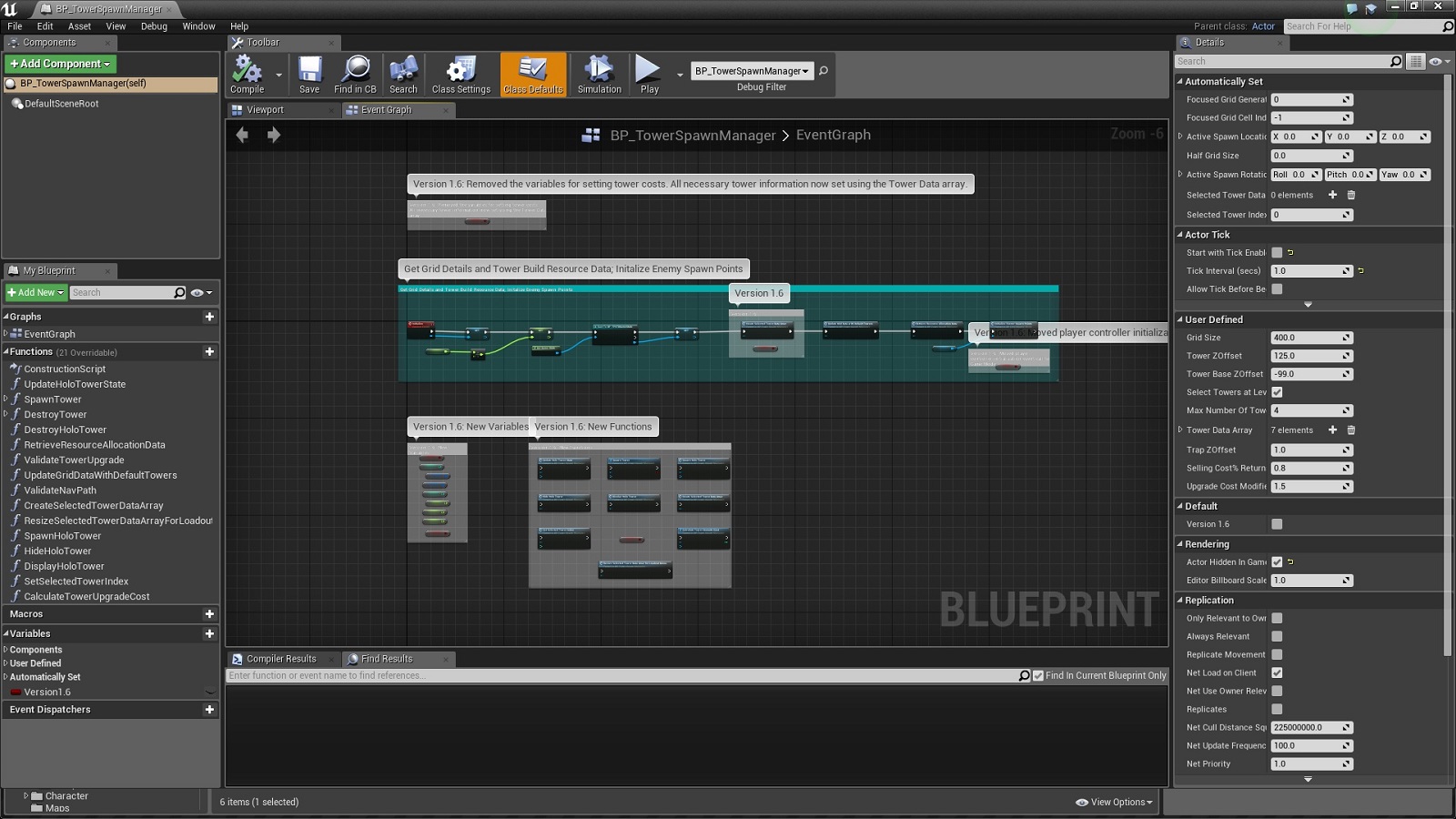
All changes within the blueprints are marked with the boolean variable 'Version1.6' in order to easily identify the workflow changes introduced with this update. Comments are also written to describe the major changes. The new variables as well as functions added to existing blueprints are also marked in the event graph as shown below:


Changes in the Content Browser:

- New enums: EHUDState, EHUDStatsType, ETowerConstructorMenuType & ETowerFunctions.

- New interfaces: BPI_GridLink, BPI_GenericHUDUpdates & BPI_TowerFunctions.

- 'Struct_GridGeneratorData' renamed to 'Struct_GridCellData'.

- 'Struct_MapGridData' renamed to 'Struct_GridData'. New member added to struct.

- 'BP_TowerSpawnHandler' & 'BP_WaveHandler' renamed to 'BP_TowerSpawnManager' & 'BP_WaveManager' respectively.

- New struct: Struct_TowerData.

- New default HUD class added: BP_FPSTDHUD.

- New widgets: Widget_LoadoutMenu, Widget_TowerButton, Widget_TowerListBox & Widget_TowerSelectionMenu.

- Navmesh runtime generation changed from dynamic to dynamic modifiers only.

- BP_PlanarGridGenerator moved to GameplayActors folder.

- Removed 'BP_FloorGridGenerator' & 'BP_WallGridGenerator' blueprints.


For more details, check out the official support thread in the Unreal Engine forums at: https://forums.unrealengine.com/showthread.php?79300-FPS-Tower-Defense-Toolkit

Monday, 25 April 2016

Tower Defense Starter Kit: Update I Change Log

Update I (v1.1) [compatible with Unreal Engine v4.11] project files for the Tower Defense Starter Kit are now available in the Unreal Engine Marketplace. Since this update brings about a lot of changes, both in terms of new features as well as the improvements over the previous v1.0 implementation, the update has been released only for Unreal Engine v4.11. This ensures that anyone who wants to keep using the v1.0 implementation can still download the v4.10 project files from the Marketplace. 

Listed below is a brief overview of the code changes in the update:

- Loadout & Tower Selection menus added to enable tower selection at level start. The list of available towers in the Tower Selection menu are populated dynamically based on the information specified in the new Tower Data Array. [Preview video: https://www.youtube.com/watch?v=uqLN_pxcR5k]

- The new Tower Constructor widget enable dynamic tower construction/function in-game menus [right down to button positions] based on the towers selected by the player as well as the data specified in the Tower Data Array & Tower Functions Array. Since the tower constructor can shift between a Tower Build menu & Tower Functions menu based on the context, this ensures that no HUD changes are required when adding new towers/tower functions as long as the necessary information is specified in the aforementioned struct arrays.

- Data driven tower spawn workflow implemented. Unlike the v1.0 implementation of setting default values within the tower blueprints, this new implementation showcases how to use data stored in struct arrays to control the attributes of the towers. By having all the data in the Tower Data Array, the Tower Manager acts as a central HUB for setting all user defined attributes for towers.

- New towers: Mining tower. The Mining tower harvests resources at regular intervals until the resource pool gets exhausted. Both the resource cap as well as the harvest rate can be increased through tower upgrades.

- The new modular target stats widgets can dynamically alter themselves to display relevant information about the focused/selected target based on a combination of data retrieved from struct arrays as well as the new interface functions.

- Blueprint interfaces added to handle tower functions like upgrade/sell features & target stats display.

- New HUD class to manage high level HUD state changes.

- Simplified output boost implementation for the Boost Tower.

- Added provision to set the scale [number of digits succeeding the decimal point] for target stats display in order to prevent clipping of text between widgets.

- All Grid Data updates now handled within the Game State blueprint only.

- Added level boundaries to prevent camera from going offscreen. [thanks to tanka2d for pointing out the issue]

- Tower upgrades now improve the rate of fire & tower range/resource cap alongside the normal output increase.

- Stats for all offensive towers now display Damage Per Second instead of the regular output per cycle value, thus providing more useful data to the player when interacting with towers.

- Setter functions implemented to enable variables changes to occur only from within their parent objects.

- Improved code standardization & optimization implemented across all classes.


All changes within the blueprints are marked with the boolean variable 'Version1.1' in order to easily identify the workflow changes introduced with this update. Comments are also written to describe the major changes. The new variables as well as functions added to existing blueprints are also marked in the event graph as shown below:


Changes in the Content Browser:

- New enums: EHUDState, EHUDStatsType, ETowerConstructorMenuType & ETowerFunctions.

- Enum EEnemyType renamed to ECreepType.

- Member name changes/additions in the enums ENavType & ETowerType.

- 'BP_BulletProjectiles' blueprint moved to 'GameplayActors' folder.

- 'BP_GridCellHighlighter' renamed to 'BP_GridCellDetector'.

- New interfaces: BPI_GridLink & BPI_TowerFunctions.

- New functions within the interface 'BPI_UpdateHUDStats'.

- 'Struct_GridGeneratorData' renamed to 'Struct_GridCellData'.

- 'Struct_MapGridData' renamed to 'Struct_GridData'. New member added to struct.

- New structs: Struct_HUDStats, Struct_TowerData & Struct_TowerFunctions.

- New tower: BP_MiningTower.

- New default HUD class added: BP_PlayerHUD.

- New widgets: Widget_LoadoutMenu, Widget_SelectionButton, Widget_TargetInformation, Widget_TowerBuildButton, Widget_TowerConstructor, Widget_TowerFunctionsButton, Widget_TowerListBox & Widget_TowerSelectionMenu.

- Renamed 'WidgetBP_EnemyTypeData' to 'Widget_Stats'.


- New static mesh: 'SM_MiningTower'.


For more details, check out the official support thread in the Unreal Engine forums at: https://forums.unrealengine.com/showthread.php?102675-Tower-Defense-Starter-Kit-Support-Thread